Showing posts with label cable. Show all posts

Thursday, 29 June 2023

Xiaomi Mi 50W 20000mah Power Bank

 So this was reviewed back in April 2023. Since it was time to get things sorted out and things are a bit tough back then. But this review was a nice way to be able to plan out the future with this.  So this was a bit of a way to work with options and since of the potential chances to video edit in the future. Like a lot better. But for around £50, it has some benefits for sure.,  Xiaomi No longer has it on the website But Amazon still does.  There is no video for this review. 


The Packaging. 

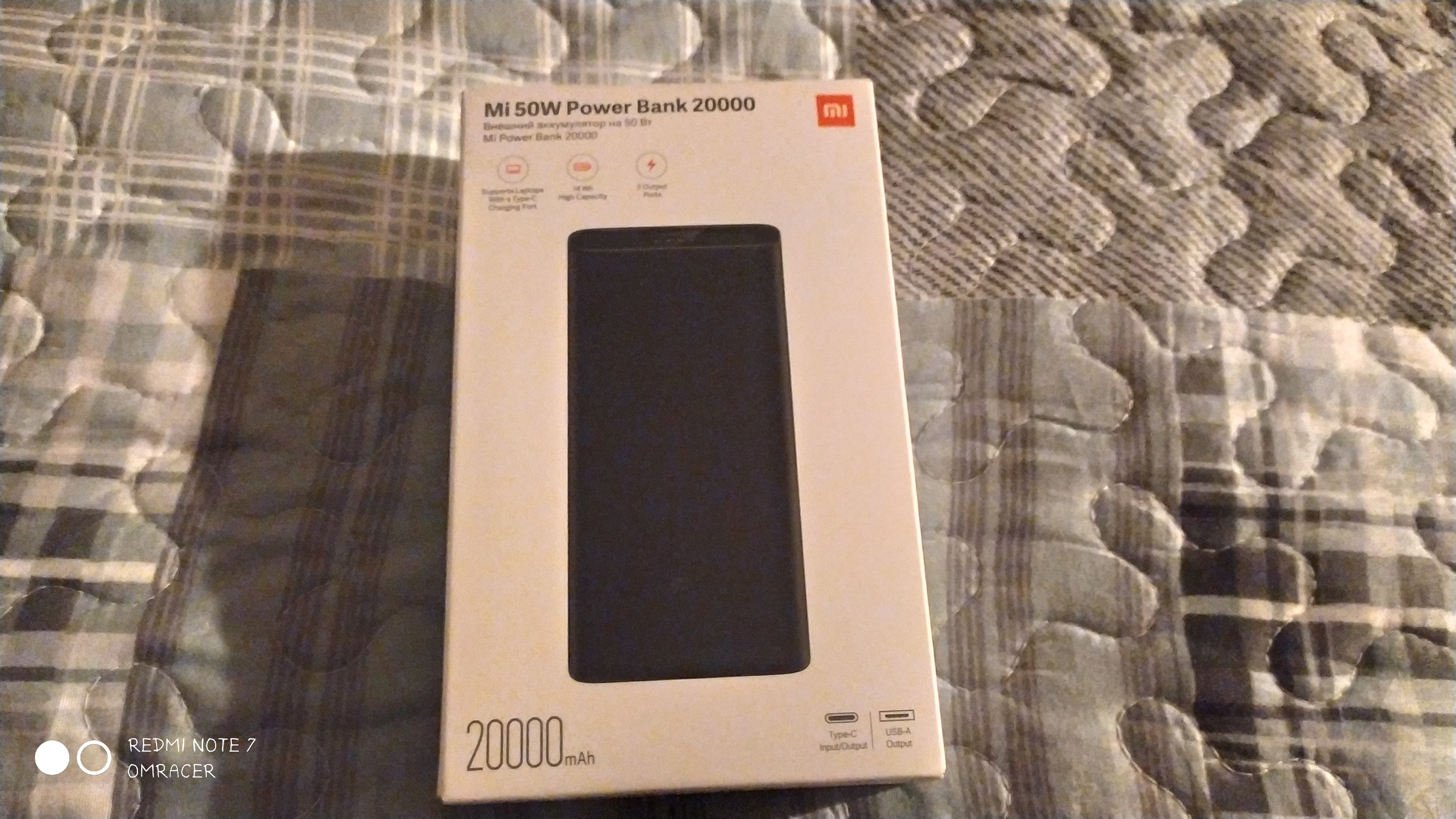
The look at the box 


So this has its Xiaomi Charm of the Apple pure white box and the clear picture of the box and also the description of that item itself, and the small print and codes on the back, but it feels like it's a posh feel for sure.


The front of the box 


The Left side of the box 


The right side of the box 


The bottom of the box 


The top of the box 


The back of the box with all the text 


As it shows most of the back with the text, some will find it a bit of a headache but for what most will need it for, it will be not looked at much either way. So it then leads to being able to unbox the power bank and see what's inside. 


A look inside the box


So this was a bit more simple but still nicely laid out and divided to make sure the bank fits nicely and tight.  There was a small jiffy bag inside and then it was the bank itself taking up most of the box, showing its true size. 

A peek inside the box 


A look at the bottom of the power bank with the bag next to it 


The top of the power bank and the bag next to it

So That and the USB cable were quite short but good ones, so it will give it some charge. Especially as this does not take as quick as other power banks to charge up, from its capacity and the WH usage. 

The USB cable it came with


So then it was time to get it set up and ready to test out.

Well, that's after we look at the power bank which does have a very clear look at the square shape for sure, as well as the engravings on the front and the bottom of the bank itself. which explains the compatible voltages, it does not carry 65W of power which I will find out later on. but it does take over 6 hours to charge from a single 1A USB Charger of 5v, but since of the 20V option for output, it can take in a bit less of just 12V input. 

The right side of the power bank


The left side of the power bank with the power button 


The top of the Powerbank with the sticker removed and the ports showing 


The bottom of the power bank with the sticker on 


Look at the bottom with the labels like the voltages 


The Testing: 


Charging up: 

So this can take up to 8 hours to charge on a 2A USB charger, so this will need a powerful charger like the Ugreen GAN X 65W for example, then it makes sense for it to charge quickly. But then it can show the progress of the charger with the LED indicator. 


The Charger connected to a slow cable 


So for that to be fully charged it was time to then get it to see if it charged devices up. So that means the phone would charge fine (the issue with the Note 7 is having issues with a weaker battery after its 3 years), So that will charge quickly with a quick charge on both ports. But the real test is the laptops 

Laptop #1: Maibenben


This does not charge since its not enough juice for the 20V and 2A when the maibenben needs 3.25A aka 65W so this will not give any power at all. I can tell since the USB Type C to 5.5 x 2.5 mm adapter does not blue led up. 


Laptop #2: Cleveo N141Zu or PC Specialist Laftive 

Now this is the main reason for getting the power bank and Yes it actually chargers up, so this can work on the power bank,and I can say, yes this works fine, and charges from 5% to 70% and use half of the battery on the bank itself. 

The battery charging via the power bank 


The Conclusion: 


This can do a lot of useful tricks and for a #omracersholiday (Not had in 4 years), it will be a tool to be able to get things uploaded much easier than it used to be. But it's been useful for when i need to eat while watching videos and not have a long cable across a kitchen and also when or if I have to edit on a coach if that comes to pass. The normal USB ports mean I can charge a phone possible at the same time. 

omracer's Rating: 7/10


The Good Points: 

  • Can charge a laptop via USB C (with the PD adapters) if 45W aka 20V with 2A
  • Chargers Phones and normal USB devices 
  • Power indicator 
  • Reasonable value for money 


The Bad Points: 

  • Can charge on older USB or slower Chargers
  • Not close to 65W for charging older and more powerful laptops
  • Quite heavy so be careful if needing it for defense if attacked 
  • Might be hard to source if Amazon sells out


And there we are, more reviews might be after summer on this case, it seems the past is catching up and repeating itself on my end on top of workaholic on top of the consequences of moving via 1-hour leg commute home. 

See you soon

omracer


Friday, 15 February 2019

Mayhem Funtech GPS Cable Micro

This review came about at the end of the time I was stood up from my 5th Date. Now Menkind I was in there to look at beer bongs for funnel feeding of all things but I found this instead and decided it was ideal for me to try out for a Reduced Price tag of £4.97. But this is a hard cable to get since not even Amazon has it.


The Packaging.


It's a nice standard cable packaging size, with the clear text in red on a silver/white background and big simple words to add the attention to it. The sides of the box say the length of the cable which is only 1m and also shows the icon for the iPark app its supposed to work with.

The GPS Cable on the front 

The back of the GPS Cable

AS we unpack it, there isn't much to go by, like not even and INSTRUCTION MANUAL, just the background of the map of some city and also the plastic the cable was placed in, which is okay but some people really would struggle to use this, it slightly implied you need to connect this to the car or some sort of power to make it work. But it does look like it should though, the cable is a reversible cable which is useful but still nothing makes it easier since that can break easily.

The connector is reversible


Its a short cable


How it plugs into the Phone


A Setup


Well, I got the app from the playstore, its a free app and a 2.8 rating so we know people say its bad from the get-go. The screenshots are not that accurate either minus one. 

The app on the playstore

I installed it no problem and it was interesting since it needed access to my location (which is on battery saving aka network only and that did NOT class as location)  so it sort of avoided the point of using the GPS from the actual CABLE in the case of my phone. But hey, it would of been useful on a phone i had many years ago.. But well things go as they are. 

Bluetooth being paired but it never got paired actually

The app only does this. Not even the share works.

Then it managed to CRASH when I clicked on share like really it just crashed, which is typical. So maybe I wasn't going to have luck with this. Glass didn't find it in settings either.  


The Test. 


Well, I fitted it to a bike using a solar powerbank and well it didn't work. Mi fit was using the GPS of the phone. So cycling to my client in brentor was going to be not using it. But then I had to cycle somewhere different and that did seem like it was working at first. 

The cable and power bank

Another view. 
So I then cycled to another customer and from that, I tried it and it seems to work at first. But as I was going up a hill, I noticed it didn't even move on mi fit map, so it basically doesn't work via the Bluetooth GPS, it did disconnect and reconnect often, especially with notifications.

Because of this, I stopped at a garage to end the review. 

The Conclusion, 


Let's be honest, its basically a USB cable that reverses as far as my opinion goes. 

omracer's Rating: 3/10


The Good: 

  • Reversible micro usb cable#
  • it's braided

The Bad: 

  • The app doesn't work properly
  • No battery for the GPS
  • Doesn't work with google glass


That is is for this tech review, i will be possibly reviewing a mech keyboard soon if i get time as well as a capture card and might do more food reviews as well. Enjoy feburary. 

omracer


Monday, 22 January 2018

USB OTG Hub Charger

Another one you ask, well its a mini review of something the next stage up for a OTG cable. IF you remember the OTG hub from last year, which i had to sell to a customer in a rush. . This was actually from Banggood, the same place as the Redmi 4 and Mi Band 2. Since its a quick one, no video on this.


The Packaging. 


In all honesty, its a white sleeve with the cable and a stick with the stock code. Plain, simple and not much clearer than that. 

A look from the top of the packet

Another look at the packet

Once opened, it shown that the cable was a bit stiff and it has a Micro USB input as well as the hub and a switch.

The OTG Cable. 

Once opened, it shown that the cable was a bit stiff and it has a Micro USB input as well as the hub and a switch. There is a LED light underneath it which can be either red or blue too. Thats the basics

The side of the hub 

The Micro USB Port. 

Now the options for the switches are: 

1: OTG Hub Function

This allows you to use up to 4 usb thingys (devices, like cameras, mice, keyboard etc) into your tablet at the same time. This does not let you charge it. 
As per the site, it is supposed to work with the following devices: 
  • Acer W4-820
  • Asus M80TA - This will not show the charging symbol
  • Asus T100TA - This will charge and allow you to use the hub AT THE SAME TIME) 
  • Lenovo Mix 2 8"
  • Lenovo Mix 3 10


2: OTG + Charge.

Now This one is supposed to  allow you to have the Hub and charge it at the same time with alot more tablets such as: 
  • Dell V8P
  • Teclast Range of Tablets
  • Chuwi VX8 3G (running Windows 8.1) 
  • Onda V975i,  V975W (both Running Windows 8.1)
  • Onda V819i, V819W (both running windows 8.1)
  • Onda V891W
  • Livefan F8C
  • Asus ME400C
  • Ramos i8Pro
  • Vido W8C
  • Cube iWork 7, iWork 8
  • Ployer MOMO8W
  • PIPO W4, W5
  • Chuwi V10HD
  • ifive MX2
  • Colorful i818W
  • HP Stream 7 

3: OTG for Certain Models

This is a special variant that only works on the Toshiba WT8 or the Lenovo Thinkpad 8, there is no reason or why this happens, but it exists.


The Testing. 


Android:

Well its the one i did test with the other hub, but it did as it sort of should. Well it charged using switch 2 and switch 3 but switch one was using the OTG and no charge. aka this doesn't actually work with OTG and Charging at the same time. 

it gives charge

OTG not working with switch 2

OTG does work with switch 1 

Windows: 

It was the same again to be fair, but it was also the need to install the drivers from the USB drive so it could not last long on power and it did switch off with the hub plugged in on switch 1, switch 2 did charge it back up again but sadly the OTG does not work on this mode. 

Installing drivers with the help of the OTG Charger 
Its charging on the second switch. 

Conclusion. 

This is a slight improvement on the other OTG Hub but sadly the trick of it charging and using OTG at the same time is going to be a tricky one. I know i could change a settings in the bios to fix this but that will risk bricking the tablet and not accepting the charge. With that in mind

omracer's Rating: 7/10

The Good Points: 

  • 4 ports on the OTG
  • Stronger Cable 
  • Micro USB Port
  • 3 different Modes. 
  • Reasonable price

The Bad Points: 

  • Modes 2 and 3 DO NOT WORK on the Onda V919 Air CH and Xiaomi Redmi 4, they just CHARGE either device, mode 1 does OTG only for both devices. 
  • There could be signs of easily bending the Micro USB pin on the Hub (Not the port, the male connector) 
  • Can be more expensive if purchasing in the UK. 

And there goes another review, I will try to get more up this year but we will see with other projects and the like as well. 

omracer


Monday, 8 January 2018

USB LED Bike Lights


The start of 2018 and I know I will already be using the bike and it also needed a wash and look at, which on this cloudy yet DRY day (Monday 08th), I managed to get that done and also fit these bike lights. This is just the blogpost, its not really worth the video for this simple one.

The washed bike, which this review begins

The Packaging. 


This is actually a nice red and black style colour for the packaging, we have this cheaply translated feel to it, with a generic image of a cyclist on the front as well as a shot of the lights. But it also has the Pagao drive pro which i've never heard of before. But the box is nice to see what is in there as well as a nice feel to the design. The features are clearly shown on the side. The back feels very generic but there is CE approval and also Warning and  also a bad Instrutions appeared, also yes, that is how it was shown on the box.

The front of  Box

The side of the box

The top of the box

The back of the box

Inside the Box:


Inside the box is actually pretty nice with transparent casing and it also has a basic amount inside like 2 Micro USB Cables, the rubber straps and also the 2 lights with clips on. 

The outside of the box with the stuff packed in

the kit in the box is now out

Fitting it. 


Its actually quite interesting, you fit the small part of the hook on the back of the lights with the mini ledge pushing it in, Then it wraps around the bike, then it gets put on, no biggie. But it worked fine for me. 

The bike on the front

The back light
There is a bright light that comes from this which surprised me on this. The night would make it bright as f and it was a good sign for any night biking. The button is at the top and the usb port is hidden away at the bottom. 

The Lights on

The back light lit


Another of the front shot

The back light USB Port

How the USB 


Charging:

Getting the straps off and charging is pretty simple, but it has a small led light that is shown when charging. That adds a nice touch. 
Charging the cables 

Conclusion:


This looks like a Chinese import but actually does what it says on the tin and can be a nice bike light for mah bike. 

omracer's Rating: 8/10.

The good Points: 

  • The fact that its USB
  • Bright lights
  • Easy to strap on
  • quite sturdy 

The Bad Points: 

  • The box is poorly written
  • The strap might be hard to fit if your not good at a guess. 
  • can be hard to find 


I will get more reviews done soon this year. 

omracer