So this one was a longer plan of getting a review of this for a while and eventually forgetting that the time to test this was too good to be true or a fake, But this is the first legit razer device I've ever used for myself, There was the kracken back in the Torchy days. I wonder what it was going to be like. But this review gives a sort of a glimpse at that. Again due to the time constraints, it's going to be a post for this. The £24 price mark is what this is but other places have it in stock.
The Packaging:
Now this is where Razer Shine, is the classic black and Green style they are renounced for, and this is no exception, it shows the Mouse itself, the text has a metallic feel and also makes it clear on what this is, though this does give an impression of an imported version from the language on the front and back. But there is some icons of the features for the mouse too. But the sides of the box just show RAZER and there retail flap at the top for the Slatwall hooks and the small print is at the bottom too which does give even more impressions this was a cheap import.
 |
| The front of the Box |
 |
| The top of the box |
 |
| The back of the box |
 |
The sides of the box are mostly the same
|
 |
| the bottom of the box with more of the small print |
When it comes to the inside, it seems to be that it is quite basic, with only cardboard and not much of a manual or even other documentation. But with the way Razer do give this on their
website is less hassle on this. But since its a easy mouse to use or so it might seem. But the cable is nicely tidy in the box top part and then the mouse Underneath. Its a nice fitting and it also comes with a cute white band too.
 |
| The Cable inside the box |
 |
| The Mouse inside the box |
The Mouse itself,
Its got that nice curve and a very clean ish white design along with the Razer Logo which we will see how it glows up. But its got the Side buttons and there is NO DPI switch which is not a bad thing so its later how that can be a good feature of making it smooth. But the cord is not a braided one, so cats and dogs might have a nice chew at it. The Sensor is quite a big one so it should not have an issue of it being dirty.
 |
| The Left side of the Mouse |
 |
| The Right Side of it |
 |
| Underneath the mouse |
 |
| The USB Connector with the cap on |
 |
| A look of the cap being off |
 |
The bottom of the usb connector is green as a nice touch,
|
The Setup and Synapse:
So it was a case of Plug and play and that means Windows picked it up, one thing to mention is that it glows White which is perfect for this. Sure the LED could be a RGB for a nicer effect but some cheaper brand will put that in their own copy like other mice do.
 |
| The Mice plugged in and glowing |
 |
| It fits nicely on the back of the PC and the cable is plenty of stretch |
Device Manager does see it as a Generic Mouse which is interesting. So it means installing the drivers might not make a difference if there is any drivers per say.
 |
| The Mouse Properties |
.png) |
| The install details |
.png) |
| Descriptions |
.png) |
| Device IDs |
.png) |
| The install details |
.png) |
| It does let it wake up from sleep via that tick |
So it then was the case of not being able to change the DPI since we needed to install
Synapse. The
Firmware update is still a TBA on what that means. But That installed pretty quickly but does take over 1/4GB aka 389MB.
.png) |
| Downloading |
.png) |
| Installimng |
.png) |
| The finish |
Synapse:
So this app you do NOT have to Sign in, which later on might be useful for but for me and the single device, yeah, thats not much of a need, for me to worry about.
.png) |
| The sign in screen for the first time |
Then it shows the devices Razer Syanpse will work with and the Deathadder appeared in a easy way to then tweak things the way I want it to be tweaked, Which then leads to the buttons are easy to configure via pressing on them. So it was easy to map buttons to what you wanted it to be.
 |
| The Syanpse Menu |
.png) |
| The settings for the White mouse |
.png) |
| The DPI Settings |
.png) |
| The choice of changing the DPI |
.png) |
| The options for more of the Lighting with the LED |
.png) |
| Now this is the nitty-gritty for the key mapping layout |
Now this means its the chance to get to map the keys, the back and forward to the DPI switching which might be easier but when using this, mouse the high DPI felt easier to get used to than the previous mice and that meant much faster scrolling for it to be used.
And Aim Test:
Well, I'm not the best FPS but it was nice to check how this turned out and was the best out of 2 and well I'm not as good as I should be for a PC user for sure. But it was better with the lower DPI from what I did test with the below score.
 |
| The results from the Aim Test |
Using on Mac.
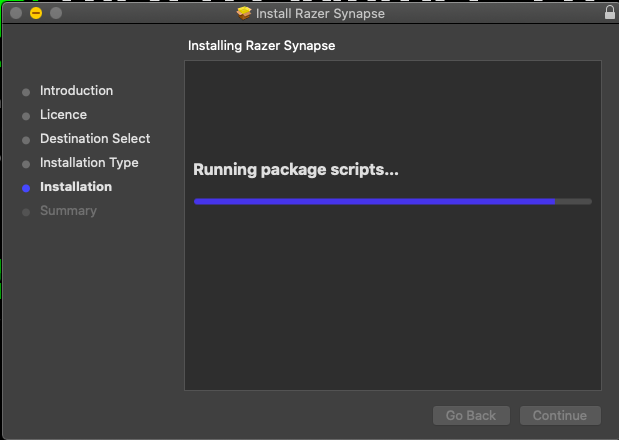
Now, this is one feature that Razer did not officially support. there have been some in the
GitHub that ended up making an open-source version of synapse per say. Since Synapse 2 does not support the mouse in question.
 |
| The Installer and the Site |
 |
| Its a pkg file |
 |
| Quick to install |
 |
| But it does use a kext and then needs a restart |
 |
| But forces to sign in to the Razer ID |
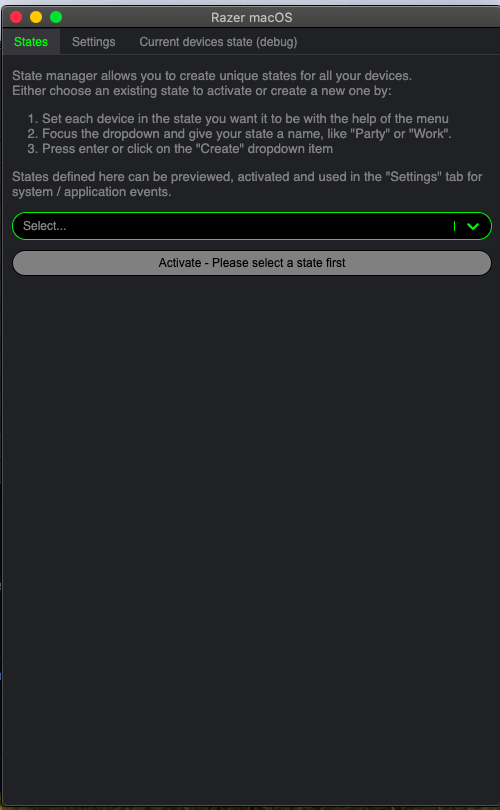
But then it was the time to try out Open Razer and actually that is a nice way to have some of the features of Synapse on Mac and yes it does things such as DPI switching ad well as the light pattern for the lights on the mouse itself, it is not too bad to install either via the dmg.
 |
| The install for the Razer App |
 |
| It means going to system preferences to open it up |
 |
| The Settings screen |
 |
| The list that actually appears which lets you control most of the settings (Not applicable for some due to the mouse itself) |
 |
| The debug state of the mouse |
 |
| The settings which includes DPI control for the mouse, the colour will NOT change |
 |
| But more settings can tell the brightness for this |
So, all in all, it means it can now be adjusted so that means Mac on the unofficial side is actually more workable instead of being stuck on a certain 3200 DPI for example. the middle of the range. So that does make it useful if I need to video edit when I get to go on holiday with the laptop.
As for Games and General use,
IT feels quite nice and even on the higher 6800 DPI it can feel very smooth and even a little too fast but again there is the chance I can change it in the synapse so it is always to be tweaked to my likening, the grip on the mouse is good so it fits my hand and does not make it a bit painful like some mice such a the
Fury Warrior
For Video editing, it gives a better option for it to be smoother when trying to drag files to a timeline such as using it in FCPX,. But it makes you sure about how it can be that extra bit smoother for those precise moments like dragging a file from one window to another.
The Conclusion:
It's a good mouse and has a nice design on it and makes it feel like it's worth getting, there are some limitations compared to some of the entry-level gaming mice out there. The Software is the bulk of the features for it so without the open-source it's more a no-go for non-Windows. But it feels exactly what it should do, sure the DPI switch is a corny option but not being here means this is one aimed to make it the mouse they want it to be.
omracer's Rating: 8/10
The Good Points:
- A Razer Mouse That's Good value for under £30
- Its White which is a change
- a Nice long cable
- Plug and play for those that want it to work
- Razer Synapse works nicely
- There is an open source way to change DPI on Mac
- There are 2 lights, one for the wheel, then the razer logo
- Very smooth with the high dpi
The Bad Points
- The Lights are only white and not RGB
- Not much sold minus some bigger retailers and online
- Not easy for those that want a simple way to install on MacOS if not using unblock
- The Cable is rubber so it can easily be chewed
- Higher DPI can get some used to if you did not give the option to change it on a non-supported OS
And there is another review, this probably will be the last blogpost only ones for a while, and hopefully some video-based ones in the near future, but that will be when work has eased off to the point I'm not typing this up at 1:40am on a work night
But for. now we can catch up soon
omracer


.png)
.png)
.png)
.png)
.png)
.png)
.png)
.png)
.png)

.png)
.png)
.png)
.png)
.png)