Showing posts with label Windows 8. Show all posts

Monday, 10 June 2013

omracer's Top 5 Screen Recording software

As some of you might not know, i used to use screen recording software for recording gameplay videos and i've been looking for many pieces of freeware (or shareware that doesn't expire but only limits use of the program) that can do the job for me with less problems. Here are the top 5 i have used in the recent years.

5: Easy Screen Recorder - http://www.easyscreenrecorder.com/

I used to use this software as my first method to capture videos from my capture card in 2007/8 when i started recording game videos, the quality was quite poor at the time but it was quite simple to use and did record into a common video file. 

Image from http://www.easyscreenrecorder.com/
It was able to record at 25fps while recording the sound with ease. Although the quality wasn't great and the sound was quite low, it did help record game videos, from ePSXe to play Rage Racer, to recording footage from WinTV from Hauppage to record gameplay from Ridge Racer Hi Spec Demo from a PS1. 

Now the disadvantage with this software is that its a shareware program, which means that you are told to purchase it and also it does leave quite a nasty watermark in the centre of the screen in the recording if its the trial version, but it can allow you to change codecs which is nice :). This can work fine for presentations and slower or older computers running Windows.

4: Hypercam - http://www.hyperionics.com/hc/

This piece of software used to be on Par with Easy Screen Recorder, although it is much faster and very common for gameplay videos, of flash games and other non DirectX games alike. I have tried this a few times, it runs much faster and more advanced settings but at the time it was left with a very old watermark that was left in the video to show it was an unregistered version. This had a clearer settings to record a certain window if you wanted to record only the game or program/app window. 
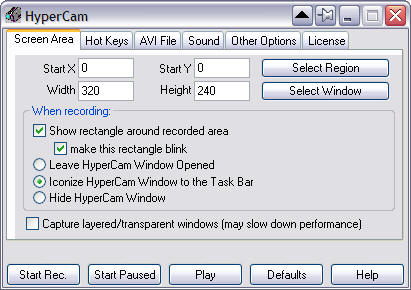
Image from  - http://www.hyperionics.com/hc/

Now after recent research, the company has decided to offer Hypercam from free for both commercial and home use, which is a good benefit if you have thought about using the software, if this had happened in 2008 then i would of been stoked and excited and happy. But this has some slight limitations if you wanted to record proper games (games that run using DirectX/OpenGL) with this. Which might make it less nicer to watch or even share on video hosting sites. 

3: MSI AfterBurner - http://event.msi.com/vga/afterburner/download.htm

Now this piece of software i've used recently, maybe within the past few months. Its quite a good extra for dedicated Computers with Graphics card in them. For example, i'm running a  ASUS AMD Radeon HD 6570 in my gaming rig and this software allows me to monitor the temperatures, control the fans (if your GPU includes some) and under or overclock the graphics processor (basically tune it to save power or run it into overdrive). But there are some extras which make this mentionable. Like below: 
Image from - http://event.msi.com/vga/afterburner/overview.htm
This is quite a powerful extra to record gameplay from DirectX games with a high framerate and high quality in a format thats compatible with many video editing programs, from Vegas to Movie Maker. I've tried this on many games and emulators i have such as:
  • Sonic Generations  - I can record at 30FPS 
  • Ridge Racer Unbounded Demo - I can record at 30FPS 
  • Outrun 2006 Coast2Coast - I can record at 60FPS
  • Dolphin (Sonic Colours) - I can record at 45FPS
  • ePSXe - I can record on 60FPS
  • PPSSPP (Ridge Racer 2) - I can record at 60FPS
Now this also allows extras such as recording 2 audio inputs at the same time into the recording. For example i can record LIVE commentary while playing Sid Meier's Railroads or LIVE Raging while playing a shooter or a tricky PSP game using PPSSPP.

Believe it or not, this does NOT require a MSI manufactured AMD or Nvidia GPU to work, this works on any GPU, even on the Intel HD Graphics series (Untested but i might test soon), and it also allows remote management so its worth a download to try.

2: Microsoft Expression Encoder Screen Capture SP2 - http://www.microsoft.com/en-gb/download/details.aspx?id=27870

Recently Microsoft has expired the "Expression" franchise of software and are merging it into other products, but one of their free downloads is for Expression Encoder. Now this is to help organisations create live streams and also encode videos compatible for Silverlight video players. But an extra was added, screen capture. Which is working really well and the quality is extremely high and works on Windows 7/8, especially on the Windows Store apps, which i feel is the main reason i'm ranking this in 2nd place. 

Image from myself - Showing settings that can be adjusted, although i recommend these.

There is alot of options and tweaking to set up every time, which can be slightly annoying but can improve the quality of the recording and what to record. Another bonus is that you can includa another input device, such as a capture card or a webcam in the recording which can give a better effect for a live commentary for the video. I have tested it on my desktop and laptop and it can handle both quite nicely, there is a slight bit of jittering but it could be some more settings to tweak to fix this. But i've tested it on the following:


  • Jetpack Joyride (Windows Store) - Records smoothly most of the time but can show a bit of jittering.
  • PACMAN Championship Edtion DX (Windows Store)  - Records at a playable rate but it can slow the game down, with the music ending 1 minute earlier than it should do on a 5 minute score attack.
  • Ao Oni 6.23  (Desktop) - Records very smoothly.
  • Windows 8 - (Desktop) - Records smoothly - transitions might be jittery.
Since its free, its worth downloading and trying out.

1: DXTory - http://exkode.com/dxtory-features-en.html

This is another piece of shareware that is used for screen recording, although it only works in DirectX and OpenGL applications, the compatibility of what it supports is much greater and is much better than fraps and much cheaper if you decide to purchase. The software does require a fast write speed on the hard drive, which is fine if you use an SSD, but SATAII HDD's might feel a bit of lag if recording. But the features of DXTory outweigh the negatives by a long shot. With different codecs to choose from, extra audio inputs, Directshow outputs to be able to stream to sites like uStream and Twtich TV. 
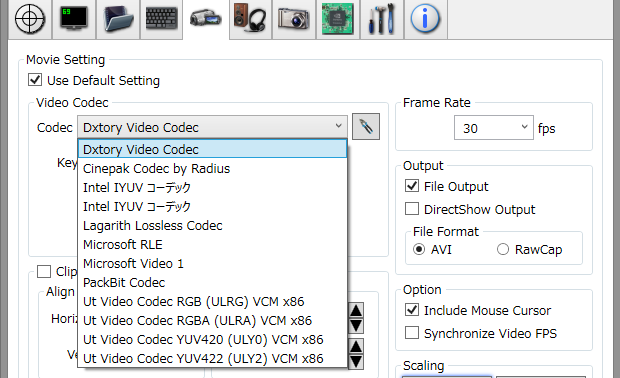
Image from - http://exkode.com/dxtory-features-en.html
An advantage with DXTory compared to Afterburner is that it can support Adobe Flash Player Standalone, which is very useful if you wish to record flash games with ease and even hide the cursor, i've done this with one of my most popular videos on my Youtube Channel. Which although that was recording when i had a Pentium D 925, it still recorded very nicely. 

Although this is technically shareware, the limitations of this are much improved compared to Bandicam and Fraps, which give you a timelimit per recording. 10 minutes for Bandicam and 30 seconds for fraps. The only limitations is that there is a watermark on both the footage recorded and in the directshow output as well as a prompt to persuade you to purchase the software, but there are license files that can easily avoid this, which can also be available for fraps.


I hope this gives you a helping hand to guide you to use screen recording/capture software for games and any tutorials you might want to create. 

See you in the next one
omracer


Thursday, 2 May 2013

Sony Movie Studio Platinum 12 review

As many of might now, i do create videos and i have used different pieces of video edting software to achieve this. One of the software i have used is from Sony Creative Software which is Sony Vegas. Now i have been using Pro 8 for many months and i've gotten used to the way it works and its features.

Now recently there was an offer for a more consumer version of the Sony Vegas franchise on offer for £19.99 Inc VAT. This is a really good value deal consider Sony have the RRP (Recommended Retail Price at £69.95. I decided to purchase it after arriving home from work on Monday (29 April. 2013).

So after ordering it on Monday, i was told on the Wednesday via E-mail and it would arrive on Saturday. Little did i know this was not the case and it arrived on Wednesday, even on the "Super Saver delivery" which is free from amazon. After unboxing the packaging, it was a nice white box as shown below:

The amazon packaging with the outer box of Movie Studio Platinum 12
Basically the box was pretty neat looking and showed off many of the features as well as the system requirements  Screenshots of these are below:
The front of movie Studio

The inside cover of Movie Studio. This shows what features are included such as capturing the footage. letting you import from various devices,supports many common video filetypes, creating and editing with amazing, yet professional effect and sharing them to DVD, Blu-Ray or even online to FB (if you want to do it for the "likes) or better yet, Youtube :)

The back of the Movie Studio Packaging. Includes an image of the interface, Shows the tutorials feature and the system requirements down at the bottom in different languages. 
The packaging looks good and easy to read and understand the basics of what Movie Studio can provide your videos with. As well as this, the System Requirements are quite basic but can  be quite demanding if you are using an older laptop or desktop. I'll list them down below from the Sony Website

  • Microsoft® Windows Vista® 32-bit or 64-bit SP2, Windows® 7 32-bit or 64-bit, Windows® 8 32-bit or 64-bit operating system
  • 2 GHz processor (multicore or multiprocessor CPU recommended for HD or stereoscopic 3D)
  • 500 MB hard-disk space for program installation
  • 2 GB RAM (4 GB recommended)
  • IEEE-1394DV card (for DV capture and print-to-tape)
  • USB 2.0 connection (for importing from AVCHD, XDCAM EX, NXCAM, or DVD camcorders)
  • 512 MB Graphics Card memory
  • NVIDIA or AMD Radeon  Graphics Card or Intel HD graphics 4000 or Newer (If it supports OpenCL, this will be fine for it)
  • Windows-compatible sound card (ALL Laptop computers have this built in)
  • DVD-ROM drive (for installation from a DVD only)
  • Supported CD-recordable drive (for CD burning only)
  • Supported DVD-R/-RW/+R/+RW (for DVD burning only)
  • Supported BD-R/-RE drive (for Blu-ray Disc™ burning only)
  • Microsoft .NET Framework 3.5 SP1 (included on application disc, built in on Windows 7, Windows 8 requires a download)
  • Apple® QuickTime® 7.1.6 or later for reading and writing QuickTime files (if you use iTunes, this is already included, although there are reports QuickTime versions over 7.5 can be an issue, but that might be only with versions under
  • Internet Connection (for Gracenote MusicID Service)
Now although it doesn't mention Windows 8 support on the box itself, it is supported and working on windows 8 just fine, heck even vegas pro 8 was fine on windows 8 with no hassle (Except if you use iTunes).  But before i explain more about how it runs, i'll show you what it includes below:
The inside packaging includes:
  • A copy of the Serial Numbers for both Movie Studio and DVD Architect 5
  • A set of anaglyph 3D Red & Cyan Glasses
  • A advert for some extra effects FREE of charge to add to Movie Studio 12
  • The DVD with both Movie Studio 12 and DVD architect 5


This is quite a nice amount given to you with the package, especially with the anaglyph 3D glasses, i've been looking for those for 2 years without looking online since i'm not that desperate to by some. But the installation was quite easy and i was up and running in 10 minutes. I did download the updated version instead of using the disc (to get the Windows 8 compatible version) and installation on both my laptop and desktop was easy. Then the registration was a 2 minute simple form signing and i'm activated legitimately on both machines. After that, the splash screen followed by Movie Studio itself:

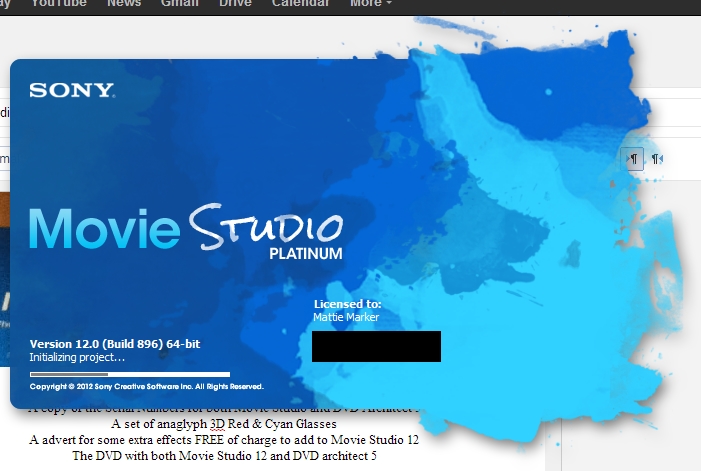
The splash screen for Movie Studio. This is very quick to load, faster on my laptop then my desktop for some reason :)


The main screen of Movie Studio after the splash screen (you do have a start up windows appear but unchecking that will lead you straight to this). It shows up with the Media libary with other tabs to explore, the timelines with 5 preset tracks to help organise the video when editing and the Preview of both video and audio levels

 Now the layout is very familiar which makes it easier for me to edit my videos, the options are still in the same places, which means i can apply the same techniques to my videos with ease....or so i thought.

Now i used vegas to add a easy watermark and also upscale it to 720p. I can do the upscaling quite easy with changing 1 option on the source section of the menu as shown below:
This is the Event Pan/Crop window. This allows you to apply croping and adjusting the clip to any aspect ratio. This is also incredibly useful for filling out a 4:3 clip to 16:9.
Then i can adjust the text to make a banner like watermark to many videos i have edited. With Vegas is was a more simplistic view to add and modify the text, with tabs to show off different categories and it was neat and effective. An example of how this looked is shown below:


The text feature in Vegas Pro, much simpler with tabbed options and it shows how the text is applied on to the video itself, with a nice translucent boarder to make it easier to show off the video and make the text clear.


 However, in Movie Studio. The same features are there and some new ones but the layout has changed which personally is harder to navigate and some i have yet to learn or master, but you can see the new layout down below, even the options allow you to have 1,2 or 3 columns to help navigate.
The text features in Movie Studio is more advanced but looks more clunky and not as nice to navigate. But the features are still the same although harder to find in some cases. Although its easier to save it as a preset to help save time.
Now there are less video effects than in Vegas Pro (40 less than version 12) but with 350 effect to choose from, that should give you a slight advantage with choosing the right effect and the right moment. The effects are like text and can easily be dragged and dropped onto the timeline. 

Many of the Effects include:

  • Chroma Keys - Used for Blue/Green Screens
  • Borders
  • Sepia
  • Black & White
  • Deform
  • Sphere
  • Cookie cutter
  • Blur Adjustments - includes 4 variations of blur
  • Saturation Adjustment
This can be handy if you want to give your viewers a nice bit of creativity to add to a scene you've filmed or just when you kill someone on a FPS game video (yes like those PWNING NOOBS videos regarding Call of Duty and Battlefield games). 


Now the next stage or final stage i can comment on is the Rendering. With Vegas Pro 8, all i had was CPU rendering, which although its nice on a Intel Core2Quad Q8300, it still might not be as fast as using a Graphics Card. But thanks to new technologies, its now possible to let the GPU render the video. 

This can help when wanting to render in a rushed situation, which i have had times where rendering ASAP is pretty important. But rendering or setting up the rendering is slightly easier than i was wondering. With the rendering windows in Vegas Pro, it was a simple "save as" window and you options and formats in different drop down boxes, like below:
The Render window in Vegas Pro, its nice and simple.
But with movie Studio, the interface has changed into a bigger layout and makes it easier to see all the settings and formats and also filter out the options you don't need which is easier :). Take a look below:
This is the Render Screen in Movie Studio. The layout simplified, but bigger and more options you can choose from and also the options are filtered out to what your project supports if you choose to filter them.
Now rendering is the same speed i feel with both Vegas Pro 8 and Movie Studio 12. The time it had taken for Movie Studio to render a 720p 25FPS video of a flash game i had recorded footage of using Dxtory was about 10 minutes. The quality however was incredible. The video was at a 2mbps bit rate and looked crystal clear. This was using the Main Concept AVC/ACC format and rendered at best settings. If i had used other settings, the OpenCL rendering would of been much faster, but that will be a trial and error i can experiment with later on with using Movie Studio more often.


In conclusion i rate Movie Studio Platinum 12 a 4/5. 

It works nicely for the value of £30 (even better with the current offer) and provides all the features i have used in Vegas Pro 8 and extras i might use in the future. It feels and works mostly the same which allows you to work the way you might be used to. But as amazing as it works, there are downsides like not being able to open Vegas projects and the text editor layout being different. 

Well worth the buy if you want to improve your videos whether it be for Youtube or just a family DVD. 
If you want to purchase it, click below:


Thursday, 25 April 2013

Some of the top 5 trending Laptops in April 2013

So with many gift ideas and the use of the internet. Laptops are becoming quite crucial to be productive, be entertained and store memoires of your life on the go. But with people having limited budgets and also not knowing what the best offers are available currently, this post can help you choose some good laptops that are best selling on the major shopping network, Amazon.
Below are the top 5 laptops selling and a short review to go with them.

5: ASUS K55A-SX398


This laptop is made by ASUS who are based in Taiwan. They do make quite good quality laptops as well as other components such as Motherboards, Graphics Cards, Monitors/PC Screens.
The quality of this laptop has high standards, featuring a 15.6" High Definition Screen, Windows 8 and an Intel Core i7 2.3Ghz which is a very powerful processor which can fly by with many multi-tasking features.
    Also the laptop features a generously sized 1TB hard drive. Which is more than plenty to store pictures and videos to archive many memories in your life. As well as any documents like those dissertations you might of made in university, to novels based off a dream you had over a person you are in love with.

    This laptop also has a amazing 6GB of RAM (Memory) installed which is useful for doing very powerful tasks such as Photo editing on the go.As well as this, the laptop includes Wireless LAN which is powerful and easy to connect to any network easily and quickly using the latest technologies.

    A DVD-RW drive is also bulit in which allows you to read CDs and DVDs as well as make movies for DVD and burn music playlists to CD. With a integrated webcam of 0.3MP, it can be easy to skype your friends and family from close and afar.

    Windows 8 is installed, which is an easy to use version of windows for beginners of computers and the internet alike. If your used to the ways of windows 7, windows 8 has a desktop mode which gives you the same look and feel as windows 7.

    With a price of £499.99, its a powerhouse for a budget buck the specs are below:

    • Processor
      Intel® Core™ i7 3610QM Processor
    • Operating System
      Windows 8
    • Chipset
      Intel® Chief River Chipset HM76
    • Memory
      6GB DDR3 1600 MHz SDRAM, 1x 4GB and 1 x 2GB with expansion up to 8 GB SDRAM
    • Display
      15.6" 16:9 HD (1366x768) LED Backlight
    • Graphic
      Integrated Intel® HD Graphics 4000
    • Storage
      1TB 5400rpm 2.5" SATA
    • Optical Drive
      Super-Multi DVD
    • Card Reader
      2 -in-1 card reader ( SD/ MMC)
    • Camera
      0.3 Mega Pixel Fixed web camera
    • Networking
      Integrated 802.11 b/g/n
      Built-in Bluetooth™ V3.0
      10/100/1000 Base T
    • Interface
      1 x Microphone-in jack
      1 x Headphone-out jack
      1 x VGA port/Mini D-sub 15-pin for external monitor
      2 x USB 3.0 port(s)
      1 x USB 2.0 port(s)
      1 x RJ45 LAN Jack for LAN insert
      1 x HDMI
    • Audio
      Built-in Speakers And Microphone
      Altec Lansing® Speakers
    • Battery
      6Cells 4700 mAh 50 Whrs
    • Power Adapter
      Output :
      19 V DC, 4.74 A, 65 W ((Dual Core)) , 90 W ((Quad Core))
      Input :
      100 -240 V AC, 50/60 Hz universal
    • Dimensions
      25.1 x 37.8 x 2.55 ~3.19 cm (WxDxH)
    • Weight
      2.52 kg (with 6 cell battery)
    • Security
      Kensington lock
      BIOS Booting User Password Protection
      HDD User Password Protection and Security
    • Manufacturer Warranty
      2-year limited International hardware warranty. *different by country
      On-line problem resolution through web interface (BIOS, Driver update)
      OS (Windows® 7 ) install/uninstall consultation
      Bundled software install/uninstall consultation
      ASUS software supporting


    Click below to buy it from Amazon:


    4: HP Compaq Presario CQ58-250SA

    This is made by one of the most well known computer manufacters in the world. Hewlett Packard. Still around and creating laptops perfect for the user of many tastes. That and Compaq is still a well known brand of lower end laptops and desktops for sale. This is one of those laptops. 

    Featuring a Intel Celeron B830 1.8Ghz processor which is powerful with Intel HD Graphics yet power saving which is a nice balance for the budget user. Although this has a budget processor, the ram hard drive are far from budget. Featuring a nicely sized 4GB of DDR3 ram which is a good amount for home use and a 750GB Hard drive which is more than generous for storing files on as well as the standard features like DVD-RW drive, Wireless LAN, Integrated Webcam, Card reader and 3 USB ports to connect devices that you will need in your daily life such as printers, external hard drives and even mice. 
    The specifications are below:
    Operating systemWindows 8 64 
    ProcessorsIntel® Celeron® B830
    • 1.8 GHz 
    ChipsetIntel HM70 Express
    Memory
    Memory type4 GB DDR3 
    Memory layout(1 x 4 GB)
    Memory slots2 DIMM
    Storage
    Hard drive750 GB SATA (5400 rpm)
    Hard drive description750 GB SATA (5400 rpm)
    Optical driveSuperMulti DVD±R/RW with double layer support
    Graphics
    GraphicsIntel HD Graphics (up to 1.65 GB)
    Expansion features
    Ports1 VGA
    1 HDMI
    1 headphone-out
    1 microphone-in
    3 USB 2.0
    1 RJ45
    SlotsDigital media card reader
    Media devices
    WebcamHP TrueVision HD Webcam with integrated digital microphone
    Input devices
    Pointing deviceTouchPad supporting multi-touch gestures and on/off button
    KeyboardFull size textured black
    Communications
    Network interfaceIntegrated 10/100 BASE-T Ethernet LAN
    Wireless802.11b/g/n
    Power and operating requirements
    Power supply type65W AC power adapter
    Energy efficiencyENERGY STAR® qualified; EPEAT® Silver
    Dimensions and weight
    Weight2.45 kg
    Minimum dimensions (W x D x H)37.6 x 24.7 x 3.13 cm
    What's included
    Warranty1-year limited hardware, pick-up and return, parts and labour
    Software includedHP Registration for Windows8
    Getting started guide with Windows 8
    HP Utility Center
    HP Recovery Manager (recovery partition, recovery USB/Flash unit creation tool)
    Symantec Norton Internet Security 2013 (60 days live update)
    HP Connected Music powered by Universal Music Group
    HP Connected Photo
    HP Games powered by WildTangent
    HP Connected ePrint
    Cyberlink Power DVD
    Windows Live Essentials
    Buy Microsoft Office to activate Office software on this PC
    Product colorBlack licorice
    If you wish to buy this from Amazon, your welcome to click below:


    3: Toshiba Satellite C855-2ET

    This laptop, developed by the Japanese corporation known as Toshiba. Has bee crafted with a slim and simple design but proven effective to make the average user know what to expect when using a laptop. This particular model features an Intel Core i5 2.6Ghz processor which includes a nice turbo boost feature.

    The laptop boasts a plentiful 6GB of DDR3 RAM which is perfect for making sure you can have a smooth running laptop with no slowing down on multitasking with the power of the i5. Along with its 15.6" HD screen and Intel HD Graphics, you can enjoy the best of entertainment from the cloud or even from a DVD when on the go and even share in a living room with a HDMI port on the right side of the laptop. Plenty of storage is included with a 750GB hard drive so you can put over 50 hours of HD video and still have room for pictures and documents alike. 

    The laptop also features a 1.0MP webcam which is perfect for crystal clear Skype calls with friends and family on the go with the powerful Wireless LAN adapter built in. Another addition is 3 USB ports including USB 3.0 which will copy files over twice as fast as the time it used to take with a USB 2.0 device (that being said, if your using a USB 3.0 device). With windows 8 installed, this simplifies the ease of access to the internet, storing your memories, being productive and much more. Enjoy the full specifications below:

    Processortype : 3rd generation Intel® Core™ i5-3230M Processor with Intel® Turbo Boost Technology 2.0
    clock speed : 2.60 / 3.20 Turbo GHz
    Front Side Bus : 1600 MHz
    3rd level cache : 3 MB
    Operating System / Platform
    Windows 8 64-bit (pre-installed)
    Design Colourcolour : Dark Silver Finish with Crossline pattern, black keyboard 
    System memorystandard : 6,144 (4,096 + 2,048) MB
    maximum expandability : 16,384 MB
    technology : DDR3 RAM (1,600 MHz) 
    Hard diskcapacity : 750 GB
    drive rotation : 5,400 rpm
    DVD Super Multi drive (Double Layer)compatibility : CD-ROM, CD-R, CD-RW, DVD-ROM, DVD-R, DVD-R(DL), DVD-RW, DVD+R, DVD+R(DL), DVD+RW, DVD-RAM
    maximum speed : Read: 24x CD-ROM, 8x DVD-ROM/ Write: 24x CD-R, 4x CD-RW, 10x HS CD-RW, 24x US CD-RW, 8x DVD-R, 6x DVD-R (Double Layer), 6x DVD-RW, 8x DVD+R, 6x DVD+R (Double Layer), 8x DVD+RW, 5x DVD-RAM
    type : DVD Super Multi (Double Layer) drive 
    Displaysize : 39.6cm (15.6”)
    type : Toshiba TruBrite® HD TFT High Brightness display with 16 : 9 aspect ratio and LED backlighting
    internal resolution : 1,366 x 768 
    Graphics adaptortype : Intel® HD Graphics 4000
    memory : up to 1,696 MB shared memory with 4 GB system memory installed (with pre-installed 64-bit operating system)
    memory type : shared 
    Internal video modesThe following internal video modes are supported: :
    resolution : 1366 x 768 
    Max External Video ModesMax Resolution : 2,048 x 1,536
    Max Refresh Rate : 100 Hz
    Non-interlaced resolution with max refresh rate : 1,600 x 1,200 
    Interfaces1 × external monitor
    1 × RJ-45
    1 × external microphone
    1 × headphone (stereo)
    2 × USB 2.0
    1 × Multi-Card Reader
    (supports SD™ Card up to 2 GB, miniSD™/microSD™ Card with adapter up to 2 GB, SDHC™ Card up to 32 GB, SDXC™ Card up to 64 GB and MultiMedia Card™ up to 2 GB)
    1 × HDMI-out supporting 1080p signal format
    1 × integrated 1.0MP HD Web Camera (1,280 x 800) with built-in microphone
    1 × USB 3.0
    Expansion2 × memory slots
    Wireless communicationCompliancy : Wi-Fi®
    Network Support : 802.11b/g/n
    Manufacturer : Realtek
    Wireless Technology : Wireless LAN
    Version : RTL8723AE
    Manufacturer : Realtek
    Wireless Technology : Bluetooth® 4.0
    Version : 4.0 
    Wired communicationtopology : Fast Ethernet LAN
    speed : 10BASE-T/100BASE-TX 
    Sound systemsupported audio format : 24-bit stereo
    speakers : built-in stereo speakers with SRS Premium Sound HD™
    manufacturer : Realtek ALC269Q-VB6-GR 
    Keyboardkeys : 102
    Windows keys : Yes
    special features : Matt black tile keyboard and 10-digit numeric keypad 
    Pointing devicetype : Touchpad with multi-touch control supporting various scroll, zoom and launch functionalities at your fingertips. 
    Batterytechnology : lithium-ion
    maximum life : up to 4h00min (Mobile Mark™ 2012) 
    AC adaptorinput voltage : autosensing AC adapter (100/240 V) for worldwide usage
    output voltage : 19 V
    output current : 3.42 A
    Physical dimensionsW x D x H : 380.0 x 242.0 x 33.52 mm
    weight : starting at 2.3 kg
    Warranty1 year European Carry-in incl. local Pick-up & Return in the UK & Ireland. Toshiba also offers a large range of services to upgrade your standard warranty, please have a look at our website www.toshiba-europe.com/services to find the right service for your product. 
    Bundled hardwareAC adaptor 
    Bundled softwareIntel® AppUp Center
    Intel® Rapid Storage Technology
    McAfee® Internet Security (includes complimentary 30 day subscription)
    McAfee® Security Advisor for Toshiba
    Microsoft® FreshPaint
    Microsoft® Office trial
    Microsoft® Solitair Collection
    SRS Premium Sound HD™
    TOSHIBA Desktop Assist
    TOSHIBA Eco Utility™
    TOSHIBA Function Key
    TOSHIBA Media Player by sMedio TrueLink+
    TOSHIBA PC Health Monitor
    TOSHIBA Places
    TOSHIBA Recovery Media Creator
    TOSHIBA Resolution+ Plug-in for Windows Media Player
    TOSHIBA Service Station
    TOSHIBA System Settings
    TOSHIBA Tempro 
    Toshiba EasyMediaEasy Entertainment
    HDMI-out
    SRS Premium Sound HD™

    Easy Connectivity
    Bluetooth®
    Built-in 1Mpix HD Web Camera & Microphone
    USB 3.0

    Easy Usability
    Power-saving Eco Utility
    Touch Pad Gestures 
    Security featuresHDD password on request
    slot for Kensington Cable Lock
    supervisor password
    user password 
    Special featuresENERGY STAR 5.0 qualified computer
    Enhanced Intel® SpeedStep® Technology
    HD Audio support
    SM BIOS compliant 

    If this laptop suits your wants and needs, the link to buy this from amazon is below:


    2: Acer Aspire E1-531-B9604G50Mnks

    From one of the PC manufacturers that sponsored the London 2012 Olympic games and also my personal favourite brand which i've used for many years with hardly any problems known as Acer. They decide to bring out their new Aspire E range which allows you to simply fly through simplest of tasks and also have access to stream, create and share all of your media and have a reliable and working machine that will be there for you. The battery life is a nice reasonable time of 4 hours with a 6-cell battery included as well as a 65W mains charger .

    This model includes the Intel Pentium B960 which is a nice mid-range processor with added Intel HD graphics for both the built in 15.6" HD screen and also the built in HDMI and VGA ports.
    This laptop also features a powerful Wireless LAN chip as well as a webcam and microphone for the late night Skype calls as well as a card reader and USB 3.0 to store many memories. The Multi-Gesture touchpad makes you enjoy many of the tablet features of Windows 8 with just two fingers.

    The ram is a reasonable 4GB which is a good size to complete daily tasks with ease and speed. The same goes for the hard drive which is sized up at 500GB. Enough storage to hold 100,000s of photos and programs to help ease your life day by day, which can all be helped backed up using cloud storage such as Box or Skydrive. Below is the full specifications of this sleek looking, reliable laptop:
    Operating System
    Operating SystemWindows 8
    Processor & Chipset
    Processor ManufacturerIntel
    Processor TypePentium
    Processor ModelB960
    Processor Speed2.20 GHz
    Processor CoreDual-core (2 Core)
    Memory
    Standard Memory4 GB
    Maximum Memory8 GB
    Memory TechnologyDDR3 SDRAM
    Memory Card ReaderYes
    Memory Card SupportedMemory Stick
    Memory Stick PRO
    Secure Digital (SD) Card
    xD-Picture Card
    MultiMediaCard (MMC)
    Storage
    Hard Drive Capacity500 GB
    Hard Drive InterfaceSerial ATA
    Optical Drive TypeDVD-Writer
    Display & Graphics
    Screen Size39.6 cm (15.6")
    Display Screen TypeActive Matrix TFT Colour LCD
    Screen ModeHD
    Screen Resolution1366 x 768
    Backlight TechnologyLED
    Graphics Controller ManufacturerIntel
    Graphics Controller ModelGraphics Media Accelerator HD
    Graphics Memory TechnologyDDR3 SDRAM
    Graphics Memory AccessibilityShared
    Network & Communication
    Wi-Fi StandardIEEE 802.11b/g/n
    Ethernet TechnologyGigabit Ethernet
    Built-in Devices
    WebcamYes
    MicrophoneYes
    Finger Print ReaderNo
    Interfaces/Ports
    HDMIYes
    Total Number of USB Ports3
    Number of USB 2.0 Ports3
    VGAYes
    Network (RJ-45)Yes
    Software
    Operating SystemWindows 8
    Operating System Architecture64-bit
    Input Devices
    KeyboardYes
    Pointing Device TypeTouchPad
    Battery Information
    Number of Cells6-cell
    Battery ChemistryLithium Ion (Li-Ion)
    Battery Capacity4400 mAh
    Power Description
    Maximum Power Supply Wattage65 W
    Physical Characteristics
    Height33.2 mm
    Width381.6 mm
    Depth253.0 mm
    Weight (Approximate)2.45 kg
    Miscellaneous
    Additional InformationWi-Fi: Acer Nplify 802.11b/g/n
    Warranty
    WarrantyStandard Warranty

    If you wish to purchase this Acer laptop, the amazon link is below:


    1: Samsung NP350V5C-A0DUK


    This laptop is developed by the leading brand in Smartphones recently known as Samsung. Now the look of this laptop is fantastic, with the slenderness of the design blending in with the shining tint of blue to give an amazing effect. With a crystal clear 15.6" HD screen, its plentiful for the many potential uses of a laptop. 
    Now this model features the latest generation of Intel Core i3 Processor which aids you for having a superb performance in terms of internet browsing, creativity, entertainment, social networking and much more.

    The memory is a plentiful 6GB which can help satisfy your needs whether it be from one extreme like playing Bioshock Infinite to the other like checking the weather for the week ahead for a camping trip perhaps ?
    The hard drive is a delightful size of 500GB which is a good amount to combine many pictures, documents, videos, games, programs and the USB and HDMI ports allow you to share all of your content with ease, regardless if its to a gathering for a wedding reception, or just for a friend to help them out with a CV.

    With Windows 8 installed, you can start from fresh with a good looking machine that can pack a punch to speeding up the many activities in your daily life which utilise the internet, from being shocked at the ending of a series on Netflix, to typing up an inovice for a business who have used your services. 
    Have a glance at the specifications below:

    Operating System

    Windows 8 (64-bit)

    Processor / Chipset

    Intel® Core™ i3 Processor 3110M (2.4GHz, 3MB L3 Cache)
    Intel HM76

    Graphic

    Intel® HD Graphics 4000

    Display

    15.6" HD LED Display (1366 x 768), Anti-Reflective

    Memory

    6GB DDR3 System Memory at 1600MHz (4GB x 1 + 2GB x 1)
    2 SODIMM

    Hard Drive

    500GB SATA II Hard Drive (5400RPM)

    Optical Drive

    Super Multi Dual Layer

    Colour

    Pink

    Multimedia

    Stereo Speakers (1.5W x 2)
    SoundAlive™
    Internal Mic
    1.3 megapixel Webcam

    Communication

    802.11 bg/n 1 x 1
    Bluetooth v4.0
    Gigabit Ethernet [10 / 100 / 1000]

    Ports

    1 VGA
    1 HDMI
    2 USB3.0, 2 USB2.0
    3-in-1 (SD, SDHC, SDXC) Multi-media Card Reader
    1 Headphone out
    1 Mic-in
    1 RJ45 (LAN)
    1 DC-in

    Input

    Island-type keyboard with Numeric key
    Touchpad

    Security

    Security Slot

    Power

    6 Cell (48Wh)
    60W / 90W AC Adapter*
    * Adapter is different depend on system

    Dimensions

    372.5 x 243 x 33mm (14.67" x 9.57" x 1.30")

    Weight

    2.33kg (5.14lbs)

    Software

    S Player
    S Gallery
    S Camera
    Evernote
    Microsoft Office Trial
    Settings
    Support Center
    SW Update
    Recovery
    Norton Internet Security (60 days Trial)
    Norton Online Backup (30 days Trial)
    PowerDVD
    ※ Software can be changed without notice.

    If you wish to purchase this incredible value laptop from Amazon, you can do so down below:


    And this is a quick but hopefully detailed guide to help you choose between 5 laptops which might be possible options to purchase, regardless if its a gift for a person you love so much and would do anything for or a gift to treat yourself from that stressful week you might be having but actually people have it worse off than you. These laptops have different features which will interest different types of people, so choose carefully.

    More product reviews coming soon as well as the top 5 of more products that are trending and might need a bit of advice before buying.
    See you in the next review

    Mattie